


Firmware
Details of the upgrade
Ver. 1.00Notice
- ・ Ensure that your instax Pal 2™ has 80% battery power or more before updating the firmware.
- ・ The update can take around 10 minutes to complete. Please do not power off the smartphone or instax Pal™ until it has finished.
- ・ If your instax Pal™ 's internal memory or Micro SD card has any images that have not been transferred to the instax™ Smartphone App, you will need to transfer all images before updating the firmware.
Please ensure you have a microSD card ready, then follow the instructions below to download.
If downloading from the instax Pal™ Smartphone App
STEP 01
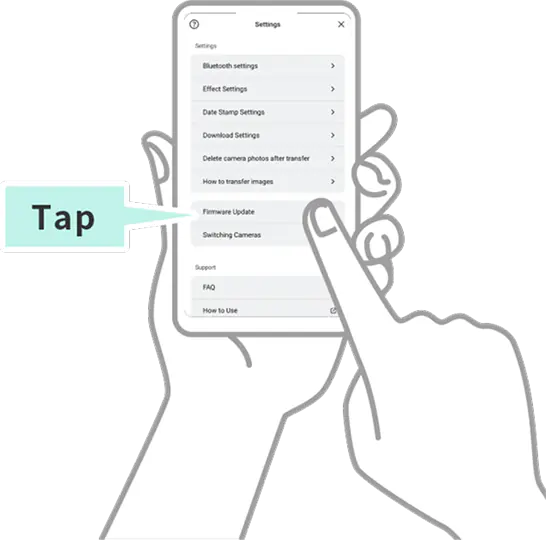
Open the instax Pal™ smartphone app and select “Camera Settings” from the menu located in the lower-right corner of the screen.

STEP 02
Select “Firmware update” and follow the instructions on the screen.
If downloading from the web
STEP 01
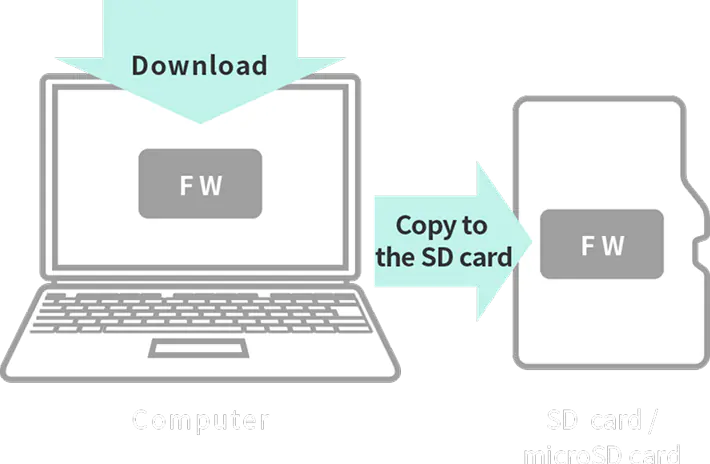
Save the latest firmware version from your PC to the micro SD card.
STEP 02
Make sure the camera is sufficiently charged, insert the micro SD card and turn the power on.

STEP 03
Select [FIRMWARE UPGRADE] from the menu to update.